Browser access, apps and shortcuts
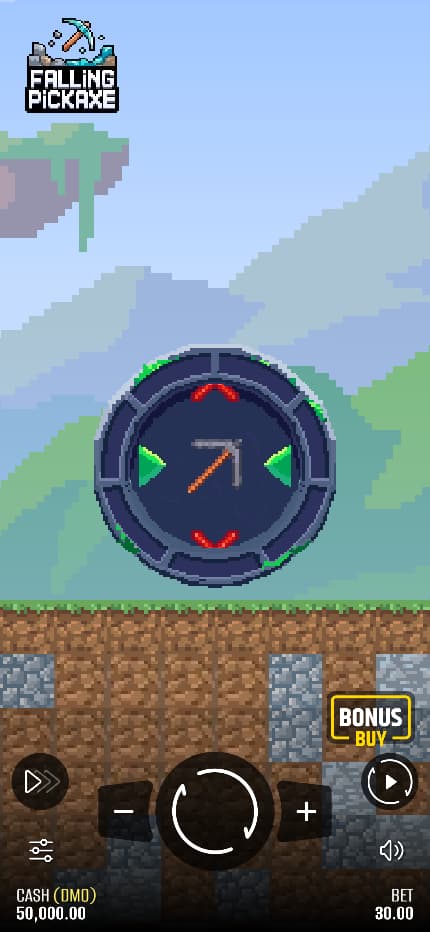
Pixmove calls the game Adaptive and shows it in a portrait layout. We opened Play Demo in a desktop browser on 16 October 2026 without installing anything.
We checked Pixmove’s public site and app-store results for a matching release. The search turned up no confirmed Pixmove app for Android or iPhone.
| Method | Status in this review | What it would mean |
|---|---|---|
| Provider browser demo | Desktop entry and Rules confirmed | Open a page and load the game through Play Demo. |
| Native Pixmove app | No official Android or iOS release confirmed | A package published by an identified developer, with a verified Pixmove connection. |
| Operator app | Availability depends on the operator’s own catalogue | The operator supplies the app; its account, catalogue and regional restrictions apply. |
| Add to Home Screen | General Apple and Google browser procedures below | A saved browser entry or web app, not automatically a native Pixmove release. |
We didn’t test a physical Android phone or iPhone. The portrait image shows a layout. The shortcut steps below come from Google and Apple.
Android browser access
Open Pixmove’s page in your phone’s browser. Follow the demo steps from there. You don’t need an APK for that route.
Before starting anything, confirm that the named game, balance units, stake and Rules are readable and that the menu can be opened. If the game does not load or an access message appears, use the demo loading checks. Do not substitute an unrelated package because it has a similar title.
iPhone browser access
Open the same Pixmove product page in the phone’s browser. The intended path remains Play Demo, then Menu and Rules. An App Store installation was not part of the verified desktop route.
Check that the game fits the screen and that you can open Menu and read Rules. Our desktop check doesn’t establish which iOS or Safari versions can run the game.
Is there an official Falling Pickaxe APK download?
We found no confirmed official APK. The demo opens on the web. If a download site offers an app by that name, check the developer and look for a matching link from Pixmove.
An Android APK won’t install on an iPhone. An App Store release would have its own publisher. The confirmed entry point is Pixmove’s product page.

Add the official entry page to your home screen
Save the stable Pixmove product page, not the temporary address of a running demo session. The icon returns you to that page; you may still need to select Play Demo. It does not establish offline play, retained credits or a native Pixmove installation.
Android: create a Chrome shortcut
With the provider page open in Chrome, use the three-dot menu and choose Install and create shortcut, then Create shortcut. Give the entry a recognisable name and confirm with Add. These are the browser steps documented in Google’s shortcut guide, consulted on 16 October 2026. They save a website entry; they do not certify the game’s Android compatibility.
iPhone: use Safari’s home-screen option
Open the provider page in Safari and tap Share, either directly or through the page menu depending on your layout. Choose Add to Home Screen, turn on Open as Web App if you want the mode Apple describes, and confirm with Add. If the home-screen action is missing, Apple’s instructions explain how to add it through the action editor. See Apple’s website-to-web-app guide, consulted on 16 October 2026.
If the saved icon stops working, open the page directly in Safari and try the demo loading checks.
Why Idle Miner is not the Pixmove app
The Google Play listing for Falling Pickaxe: Idle Miner names Neurotock as the developer, and the product description points to a separate game. Its downloads, reviews, progression and installation requirements have nothing to do with Pixmove’s gambling product.
A search for Pixmove also surfaced PixMove: AI Video Generator on Apple’s App Store, whose listed developer is 100 YEARS LATER TECHNOLOGY CO., LTD. That is a video tool, not evidence of a Falling Pickaxe release.
Operator apps and home-screen icons
For an operator app, check the publisher’s identity and the availability of this exact Pixmove game in its own catalogue. A casino listing on the web does not establish that its app includes the same game. The operator listings guide explains those access conditions.
Use the official demo access instructions for the web route. Keep the stable provider page as your saved entry; the temporary address created for an individual game session is not an app download link.
Frequently asked questions
Does a domain ending in .app prove there is an official app?
No. A domain name does not identify a store developer or establish that Pixmove publishes a native application.
Can I play offline after saving a shortcut?
No. The shortcut opens a webpage. The demo needs an internet connection to start a provider session.
Does the portrait image prove an iPhone test?
No. It is a provider-supplied image. No physical iPhone or Android device was tested for this article.
Sources and scope
Pixmove’s product page gives the published figures. We read the English Rules in the demo to check how the game works. The dates below show when we consulted each source. We didn’t test paid rounds, autoplay, purchases or withdrawals.
- Pixmove product pageProvider statement · consulted 2026-10-16
Pixmove’s published game figures and description. We didn’t independently audit its mathematics.
- Rules in Pixmove’s official demoOfficial Rules · consulted 2026-10-16
We opened Play Demo and read the English Rules on 16 October 2026. They cover the reel, HP, awards, effects, controls and settlement. We didn’t spin, start Auto or buy a feature. The client showed no build number.
- Neurotock’s Falling Pickaxe: Idle Miner on Google PlayListing or terms · consulted 2026-10-16
The Google Play listing identifies a separate idle game. We didn’t test installation or country access.
- Apple App Store: PixMove AI Video GeneratorListing or terms · consulted 2026-10-16
The App Store names 100 YEARS LATER TECHNOLOGY CO., LTD as the publisher of this separate video app.
- Google Chrome Help: website shortcuts on AndroidProject documentation · consulted 2026-10-16
Google explains how to save a Chrome shortcut on Android. The guide gives no device support, installation or relaunch details for Falling Pickaxe.
- Apple iPhone User Guide: website home-screen accessProject documentation · consulted 2026-10-16
Apple explains Add to Home Screen and Open as Web App in Safari. We didn’t test the game on an iPhone or verify a native app.

Written by
Mark Roberts writes the English guides to Falling Pickaxe and compares it with other mining games.
Published